

Feature
Social Media Department Management for Frontline Workers
Enterprise social media content management software structured the way your organization actually works. Map departments, regions, and territories into a centralized hierarchy. See which locations are active, which territories have content gaps, and where your geographic coverage is growing. Scalable to 5,000+ frontline workers across police services, healthcare networks, franchise brands, and government agencies.
Unlimited
department levels
Map-based
territory coverage
<1 hr
new location onboarding
Why Social Media Content Management Tools Break Down at Scale
Social media governance breaks down, brand consistency erodes, and coverage gaps go undetected. These are the three problems that surface first when your content management tools were not built for distributed teams.

Some locations post every week while others fall silent
Without a centralized dashboard, dormant accounts pile up while your team assumes everything is running. At 100+ locations, activity becomes uneven fast. SOCi found that locations can go 45 to 60 days without posting before anyone at headquarters notices.

Org charts have layers but social media content organization tools have one flat list
When your tool offers only a flat user list, you cannot roll up analytics by region or route approvals through your actual org structure. Altimeter Group found enterprises average 178 social media accounts across 13 departments, yet fewer than half manage them in a coordinated way.

Nobody knows which territories are creating content and which are not
There is no way to see which territories are generating content and which have gone silent. The Urban Institute found 94% of law enforcement agencies use Facebook, yet coverage across precincts remains inconsistent. Most organizations only discover a gap through a manual audit or a complaint.
How ContentBridge Organizes Social Media Content Workflow Tools Around Your Structure
From building your org hierarchy to monitoring geographic coverage across distributed teams, ContentBridge gives you a centralized social media content operations platform that mirrors how your organization actually operates.
Build your org hierarchy with departments, divisions, and regions
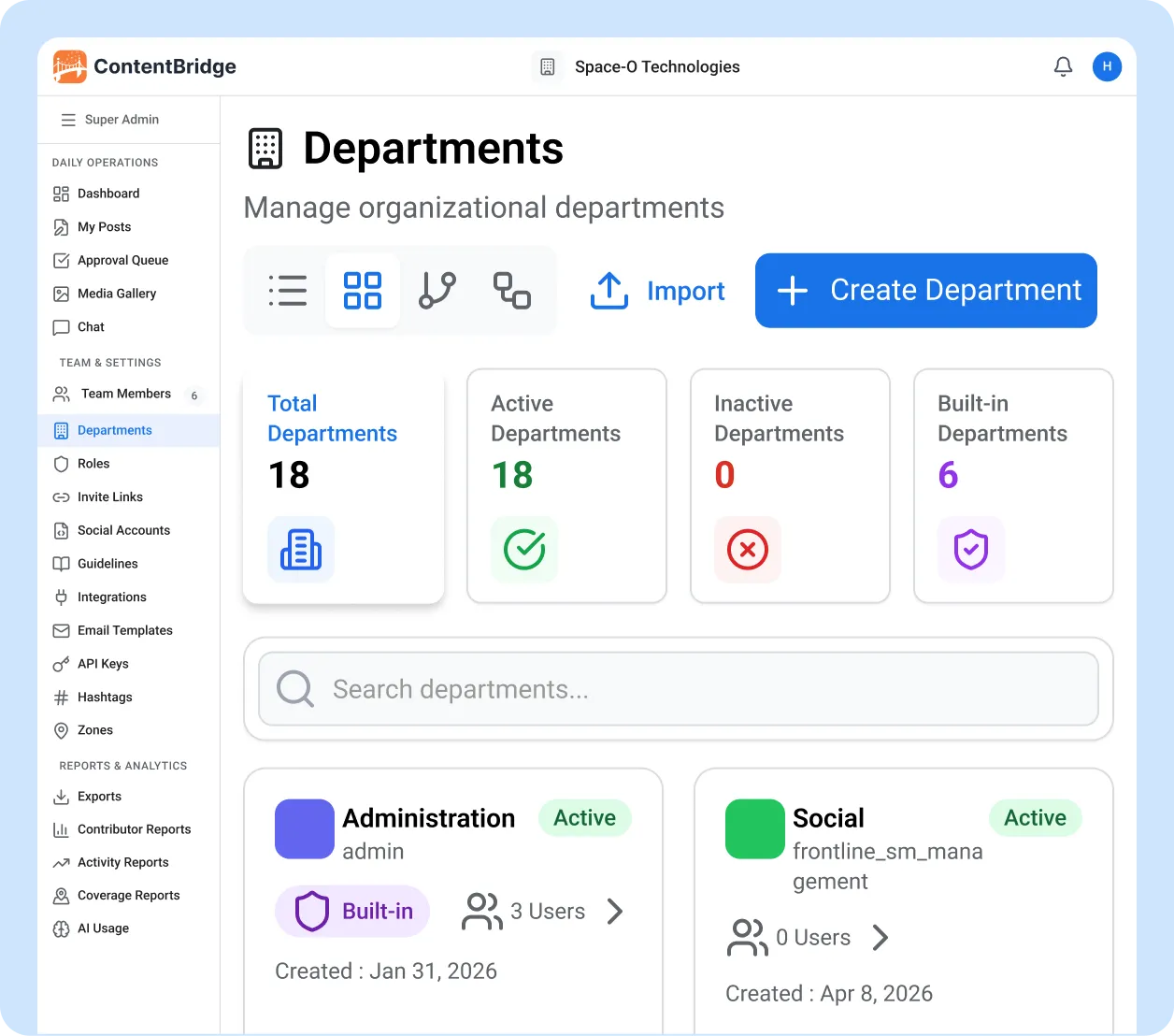
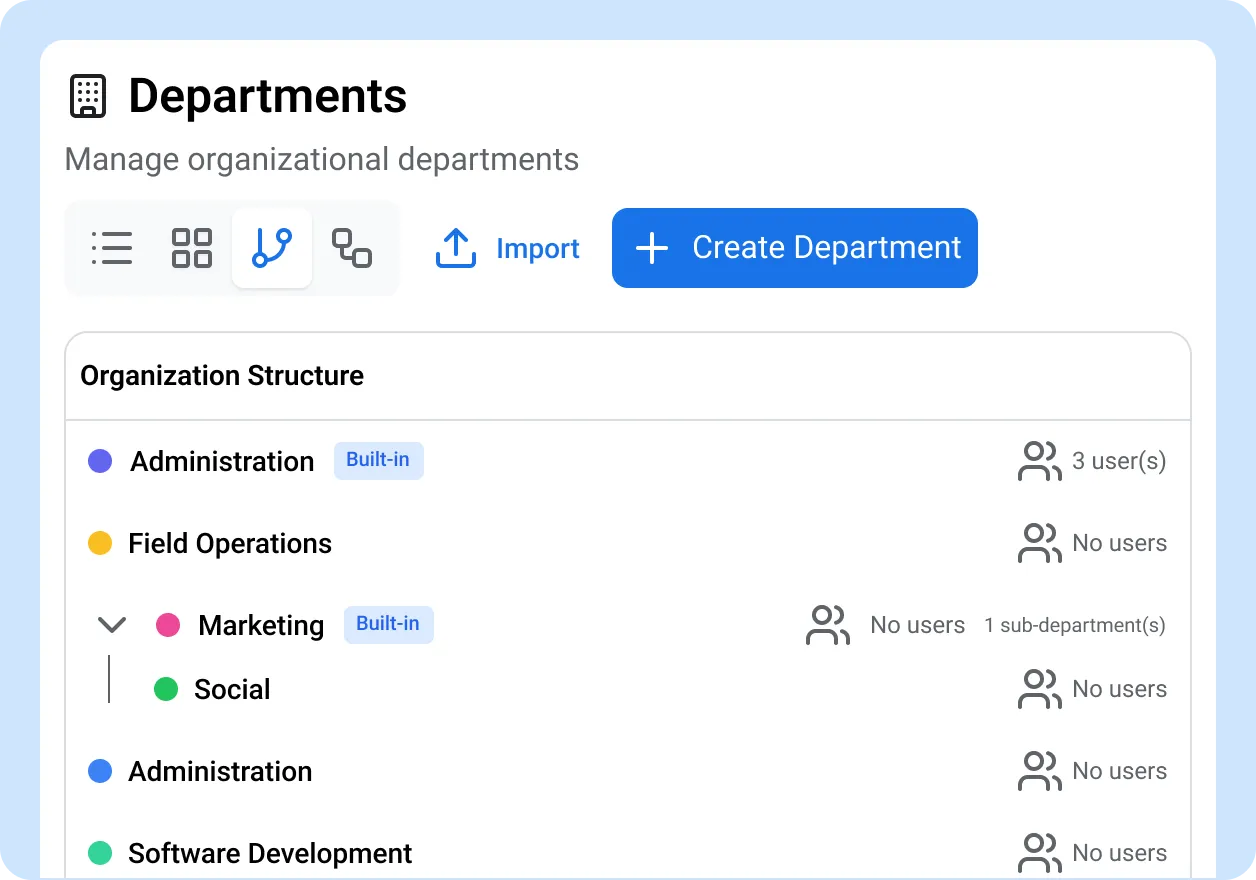
Start by creating your organizational structure in ContentBridge. Add departments with parent-child relationships that mirror your real hierarchy. Whether you have three levels or twelve, the tree view shows every layer at a glance. Unlike generic social media content planning software, ContentBridge lets you colour-code departments to distinguish divisions visually and see user counts per department so you know exactly how your team is distributed.
- Unlimited parent-child department levels
- Colour coding for visual distinction between divisions
- Interactive org structure tree view
- CSV import to bulk-load departments from existing systems
Draw territories on a map and assign them to your operations
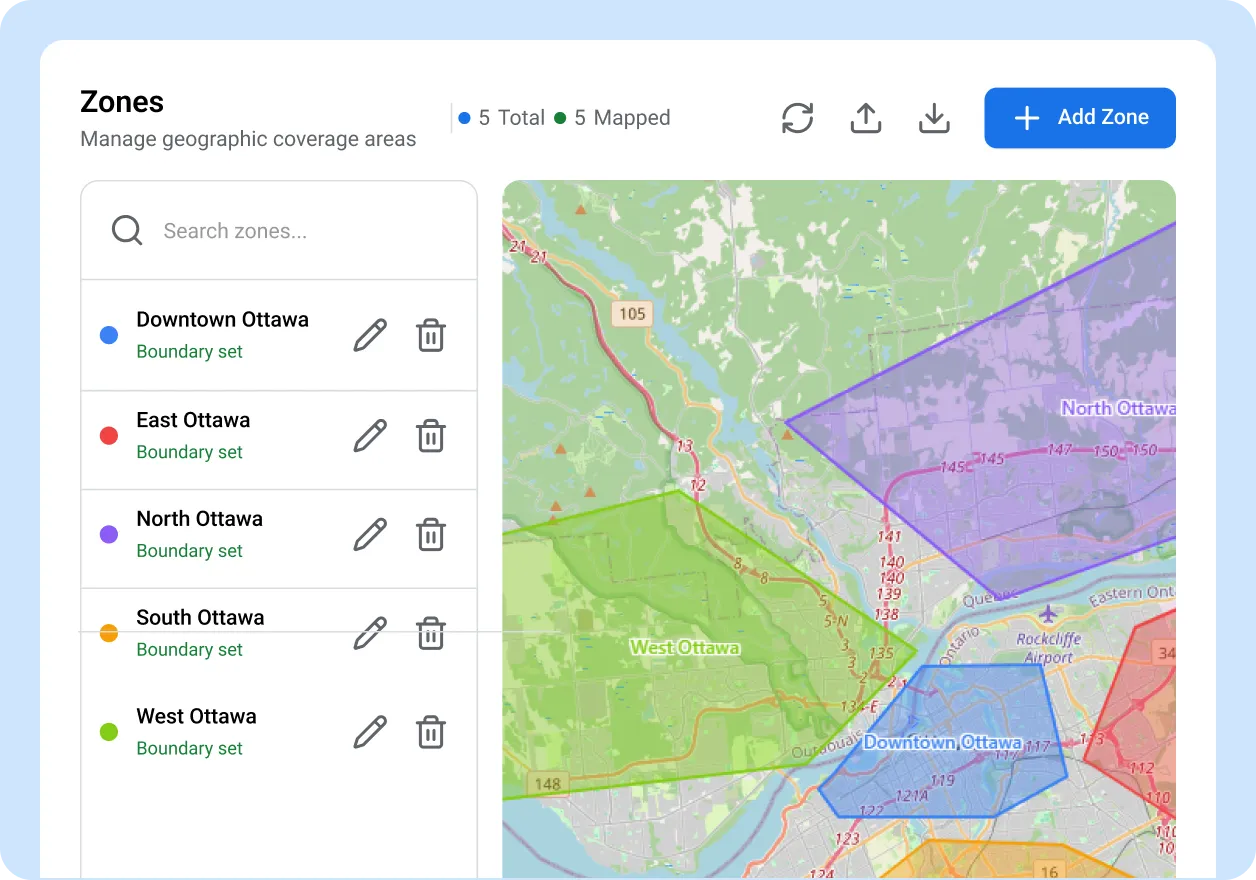
Open the territory editor and draw boundaries directly on an interactive map. Define precincts, franchise zones, hospital catchment areas, or regional districts by drawing polygons or rectangles. If you already have boundary data, import it from GeoJSON files. Each territory links to your department structure, connecting your geographic operations to your organizational hierarchy.
- Map-based territory editor with polygon and rectangle drawing tools
- Bilingual territory names for English and French operations
- GeoJSON import for existing boundary data
- Export territories for use in other systems
Monitor coverage across every territory in real time
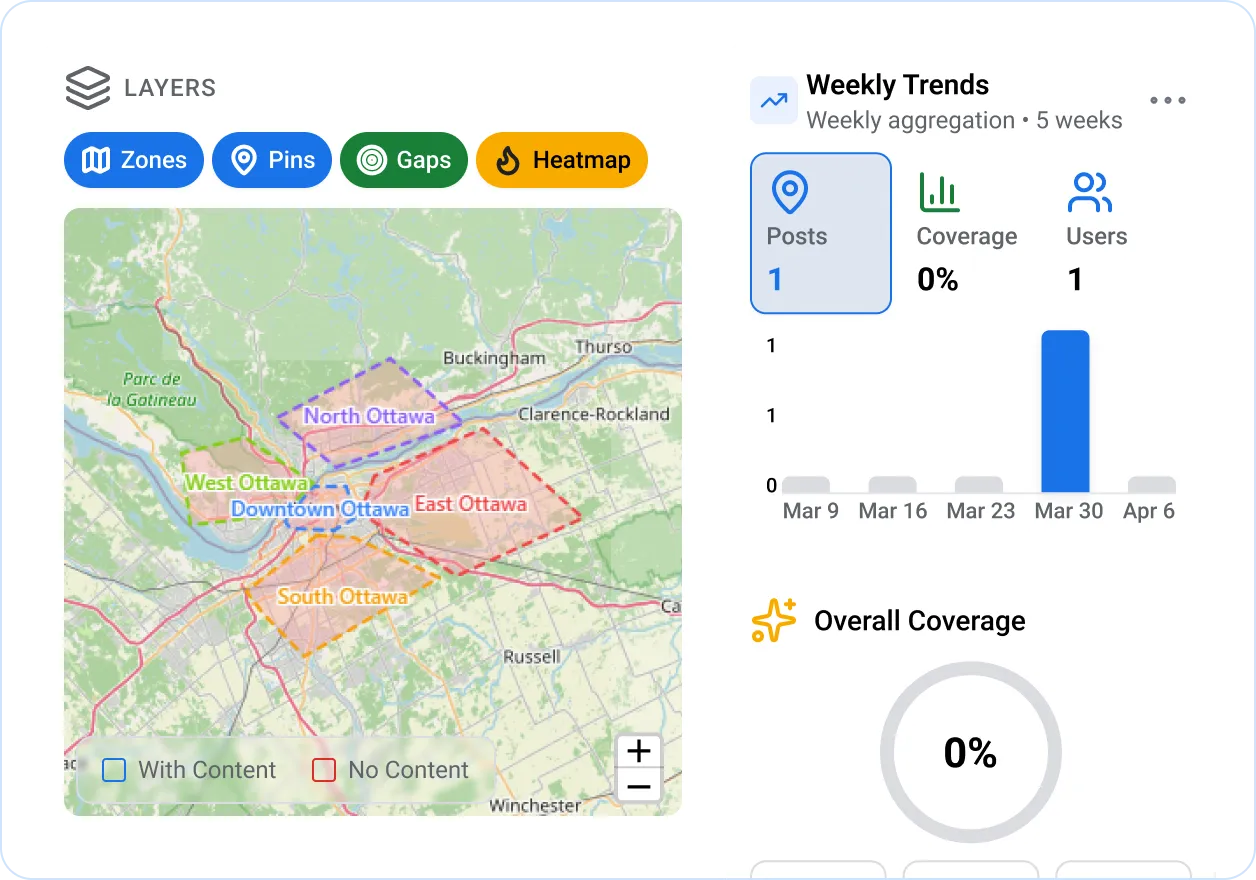
Once territories and departments are in place, the coverage reports dashboard shows you exactly where frontline content is being created and where it is not. Content location pins and a heatmap layer visualize local social media activity across your entire geographic footprint. Most social media content management software stops at post scheduling; ContentBridge goes further with a coverage stats panel that shows territories with content, territories without, and your overall coverage percentage. A weekly trend chart tracks whether your coverage is improving or declining.
- Interactive map with territory overlays and content location pins
- Heatmap layer showing content density by area
- Coverage stats: territories active, territories silent, coverage percentage
- Weekly coverage trend chart with territory type and date filters
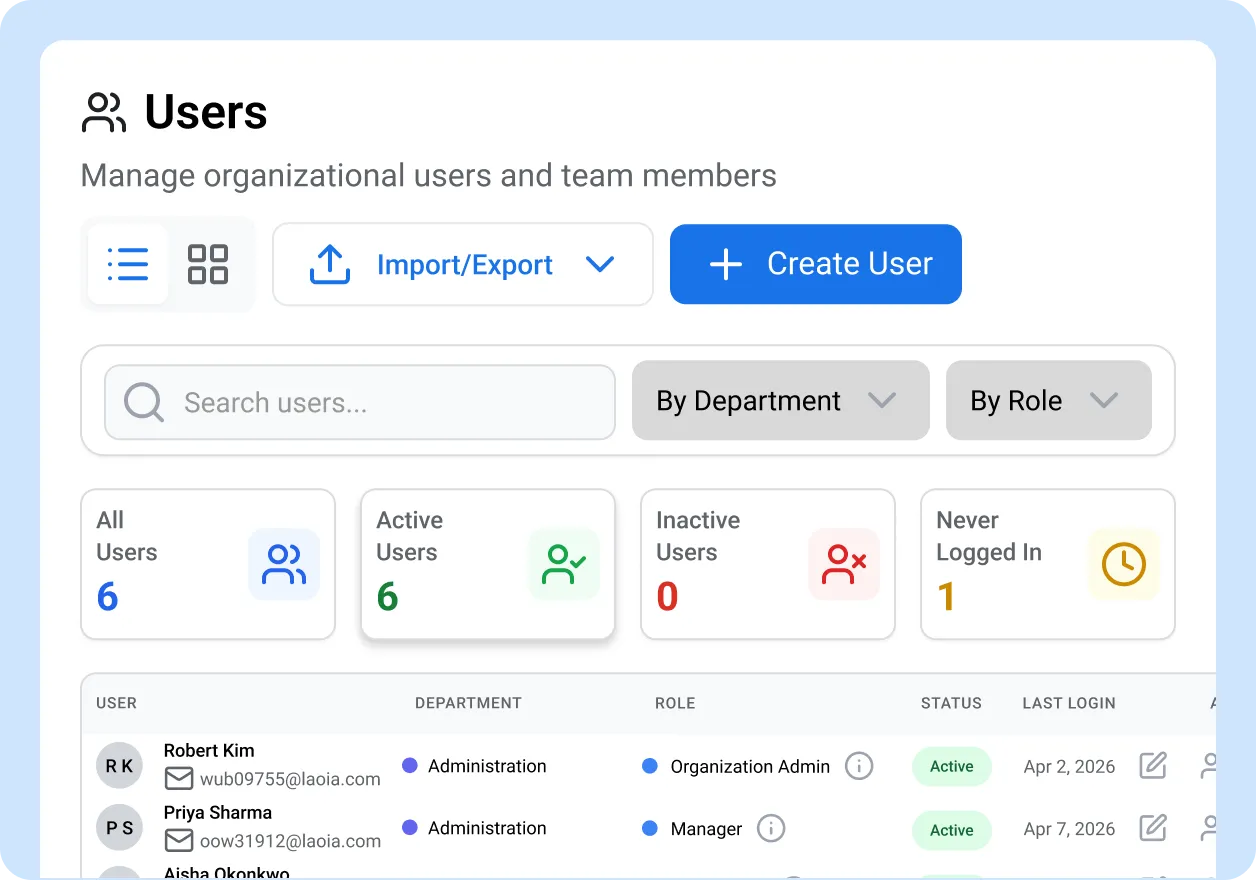
Onboard new locations and departments in minutes, not weeks
When a new franchise location opens, a hospital department goes live, or a police division starts posting, ContentBridge gets them operational fast. The onboarding wizard walks administrators through department creation, role-based permissions assignment, and approval chain configuration step by step. Industry templates pre-configure common structures for healthcare, law enforcement, government, and franchise organizations. Unlike generic social media content organization tools, bulk CSV import handles user provisioning, departments, and territories in a single upload, making the process scalable even for organizations adding dozens of locations at once.
- Step-by-step onboarding wizard for new departments and locations
- Industry-specific templates with pre-configured department structures and roles
- CSV bulk import for users, departments, and territories
- Self-registration invite links for frontline worker onboarding
What Makes ContentBridge Different from Other Social Media Content Management Software
Every capability exists because a real enterprise organization needed it to manage social media governance and brand consistency at scale. Standard social media content operations platforms were never designed for this.

Parent-child department hierarchy
Build as many levels as your organization needs. A franchise brand with Brand, Region, and Location works alongside a police service with Service, Division, Unit, and Squad. The tree view shows every layer, and analytics roll up through the hierarchy automatically.

Map-based territory editor
Draw polygons and rectangles directly on an interactive map to define precincts, zones, districts, or any other geographic boundary. Import existing boundaries from GeoJSON. Every territory links back to your department structure for unified reporting.

Geographic coverage heatmaps
Content location pins and heatmap layers show where your distributed teams are producing social media content and where gaps exist. Most social media content workflow tools lack geographic visibility. ContentBridge lets you filter by territory type, date range, or department to pinpoint exactly which areas need attention.

Coverage trend tracking
Weekly trend charts show whether your geographic coverage is improving or declining. Track the number of territories with active content, spot coverage drops before they become visible problems, and export reports for stakeholder presentations.

Bulk CSV import and export
Import departments, users, and territories from CSV files. Export your full org structure, coverage reports, and territory data at any time. No manual data entry required when onboarding dozens of departments or hundreds of users.

Industry onboarding templates
Select your industry during setup and ContentBridge pre-configures departments, roles, and approval chains based on common structures for law enforcement, healthcare, government, and franchise organizations. Customize from there instead of starting from scratch.

“We run community engagement across 22 precincts, and before ContentBridge we had no way to know which ones were actually posting. Three precincts went five months with zero social media activity and nobody at headquarters noticed until a community group raised it at a town hall. With ContentBridge, our entire precinct structure is mapped in the system, every post is tagged to its territory, and the coverage dashboard shows us gaps the same week they appear. We onboarded the last four precincts in under an hour each using the law enforcement template.”

Inspector Aisha Mensah, Community Partnerships Unit
Common Questions About Social Media Content Management for Frontline Teams
How does ContentBridge map departments and org structure to social media operations?
ContentBridge lets you build your full organizational hierarchy with parent-child departments, colour coding, and an interactive tree view. The entire social media content lifecycle management process, from creation through approval to publishing, is tied to this structure. When a frontline worker creates a post, it is tagged to their department automatically. Managers can filter content, roll up analytics, and configure approval chains by department, region, or division.
Can ContentBridge handle territory-based operations with geographic boundaries?
Yes. ContentBridge includes a map-based territory editor where you draw polygons or rectangles to define geographic boundaries for precincts, districts, franchise zones, hospital catchment areas, or any other territory type. You can also import existing boundaries from GeoJSON files. Every piece of content with a GPS location is automatically mapped to its territory.
Does ContentBridge track which territories and departments are producing content?
The coverage reports dashboard shows an interactive map with territory overlays, content location pins, and a heatmap layer. You can see coverage statistics including which territories have content, which do not, and the overall coverage percentage. A weekly trend chart tracks whether coverage is improving or declining. This visibility changes how marketing teams manage social media content across distributed locations. All reports are filterable by territory type and date range, and exportable for stakeholder reporting.
Do frontline workers need admin access to be assigned to departments?
No. Administrators assign users to departments during onboarding or at any time after. Frontline workers see only the content and workflows relevant to their department. They do not need access to organizational settings, other departments, or social media credentials. Role-based permissions control exactly what each person can view and do. Every assignment is logged in the compliance audit trail, supporting PIPEDA, PHIPA, CASL, and ATIA requirements. Organizations should consult legal counsel for their specific compliance obligations.
How quickly can we onboard an entire department or new location?
ContentBridge includes a step-by-step onboarding wizard with industry templates that pre-configure departments, roles, and approval chains for healthcare, law enforcement, government, and franchise organizations. Each template encodes social media content management best practices for that industry. You can import users, departments, and territories in bulk via CSV or GeoJSON. Most organizations have a new department or location fully onboarded and posting within an hour.
Features that work with department management
Department management is one part of a complete set of social media content management tools that ContentBridge provides at scale. These features work alongside it.

Multi-Level Approval Workflows
Route frontline content creation through unlimited approval levels that follow your department hierarchy. Each department can have its own approval chain with parallel reviewers to maintain brand consistency at every stage.

Role-Based Access Control
Assign Viewer, Creator, Approver, Manager, or Admin roles with granular permissions per department. Frontline workers see only the content relevant to their team.

Compliance and audit trail
Full chain-of-custody records for every post, tied to the department and territory where it originated. Exportable to CSV, PDF, and Excel for compliance reporting.