

Feature
Role-Based Access Control for Large Organizations
Your organization has hundreds of users who need different levels of access to social media content. ContentBridge assigns each person a role with granular permissions: Creators draft posts on their phones without touching social account credentials, Approvers review and sign off, and Admins manage settings. Department-level isolation keeps every team working within their own boundaries.
5
permission levels
Unlimited
custom roles
0
credentials shared
Why Access Control Falls Apart When Your Team Grows Past 50 People
Giving everyone the same level of access works when you have five people. It stops working when 500 people across 12 departments need to create, review, and publish social media content.

Every user gets the same level of access because your tools only offer two or three roles
Most social media management platforms provide two or three permission levels: admin, editor, and viewer. When your organization has 500 users across 12 departments, those flat permission models force you to over-provision access. A CloudEagle.ai survey of 1,000 enterprise CIOs and CISOs found that 50% of employees have excessive privileges to critical applications. Frontline workers who should only draft content end up with the ability to publish, delete posts, or change account settings because the tool has no way to separate those actions.

Adding 100 new users means configuring 100 sets of permissions one at a time
Onboarding a cohort of franchise operators, hospital staff, or police recruits means creating individual accounts and assigning permissions manually. Users who transfer between departments accumulate permissions from every role they have held. Forrester Research found that companies spend an average of $87 per password reset alone. Scale that across 500 users and the operational cost of managing access manually exceeds the subscription cost of the tools themselves.

Nobody can answer “who has access to our social accounts right now?”
When a rogue employee hijacked the New York Post’s Twitter account and website in 2022, the organization could not immediately identify who had access or revoke it. HMV faced a similar crisis when an employee live-tweeted mass layoffs from the official account to 63,000 followers. CloudEagle.ai found that 48% of former staff retain application credentials months after leaving their organization. Without a centralized system that tracks every permission assignment, change, and revocation, the access audit becomes guesswork that only surfaces after the damage is done.
How ContentBridge Gives Every User the Right Level of Access
From role assignment to audit trail, every permission decision is structured, tracked, and exportable.
Assign a Permission Level That Matches Each Person’s Job
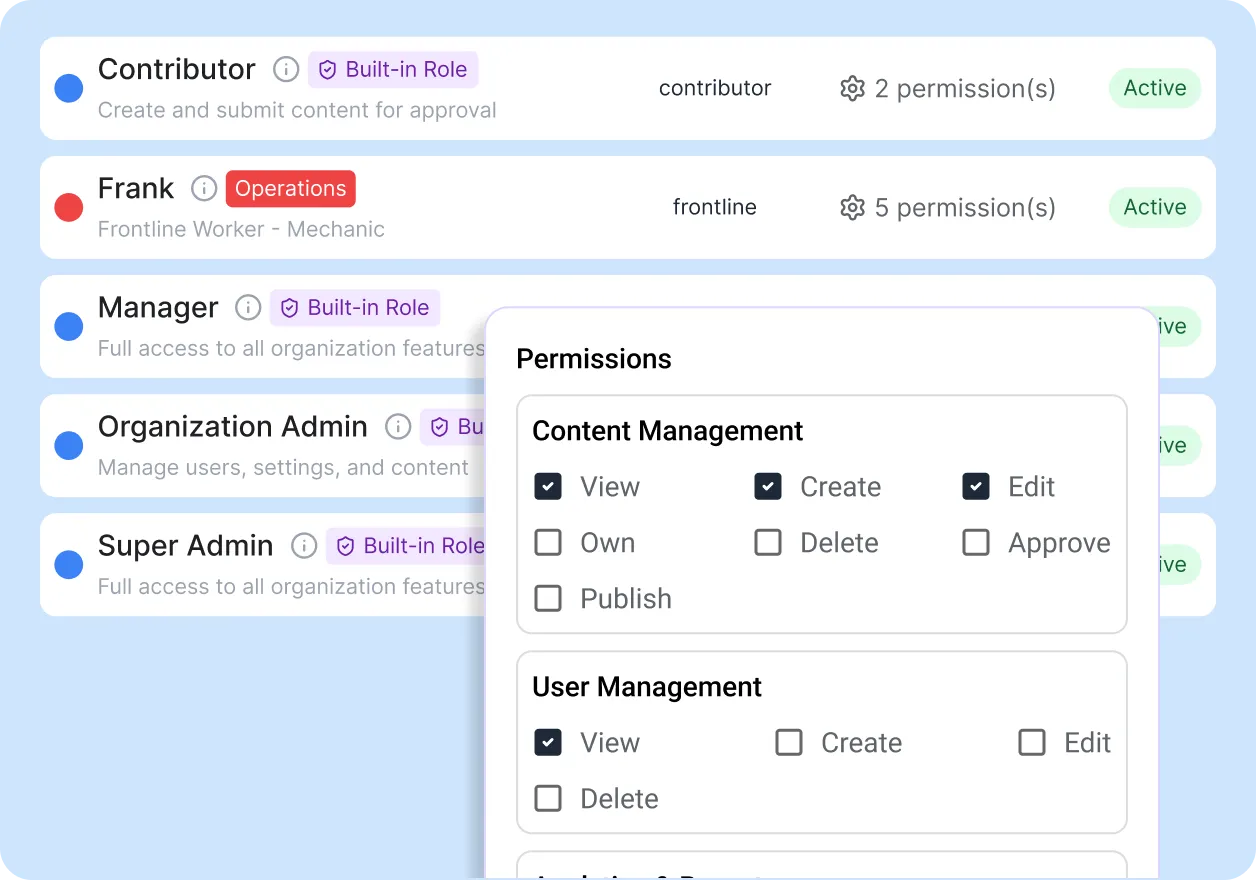
Every user in ContentBridge is assigned a role that defines exactly what they can and cannot do. Five built-in levels cover the most common permission structures: Viewers see content, Creators draft posts, Approvers review submissions, Managers oversee departments, and Admins control settings. Organizations on Professional and Enterprise plans can create custom roles with permissions scoped to individual modules and actions.
- Five built-in roles: Viewer, Creator, Approver, Manager, Admin
- Module-level and action-level permissions (view, create, edit, delete, import)
- Custom roles available on Professional and Enterprise plans
- Creators draft content without social account credentials
Isolate Content by Department So Teams See Only Their Own Work
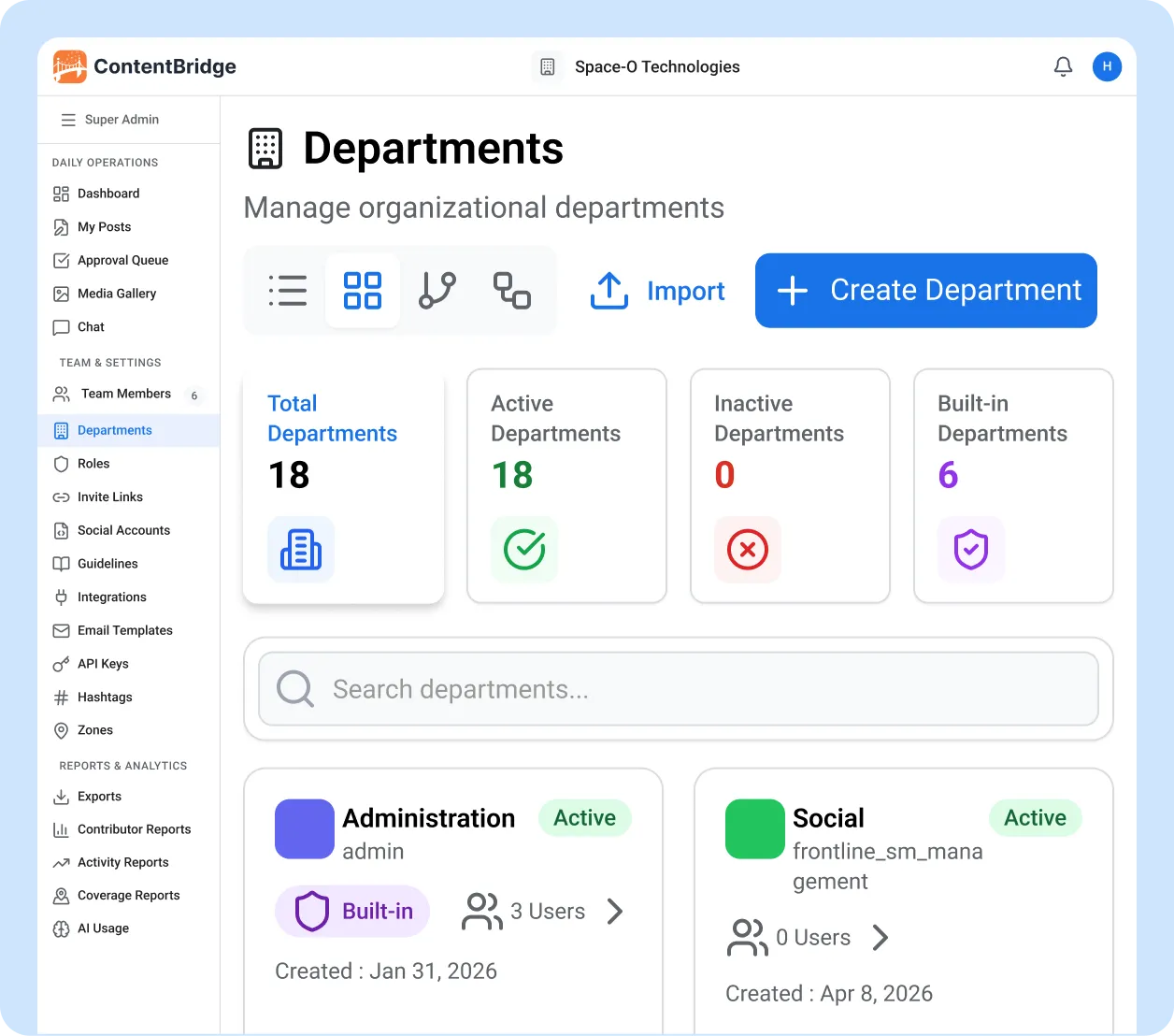
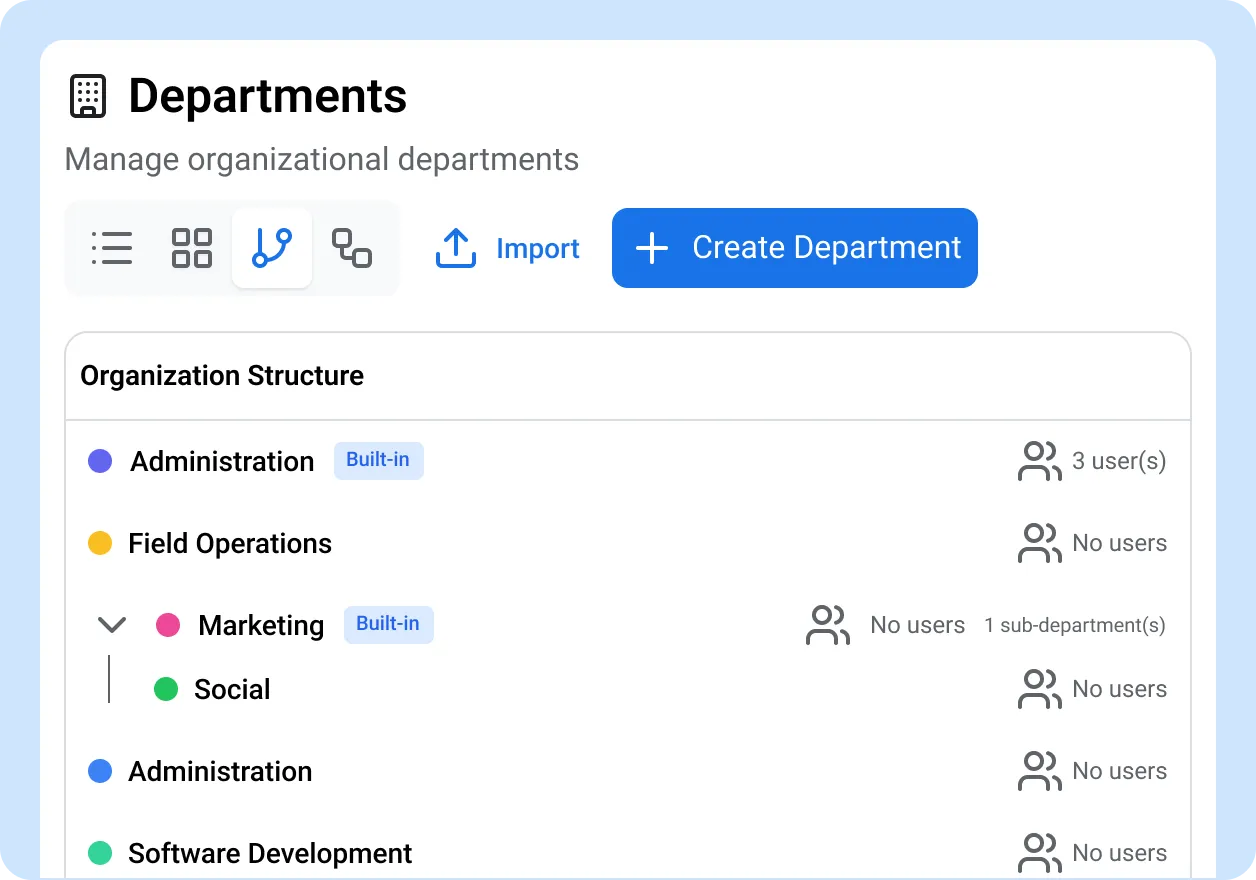
Department-level isolation means users only see the content, approvals, and analytics within their assigned department. A franchise operator in Vancouver and one in Halifax work in the same system but never cross paths. Parent-child department hierarchies let you mirror your real org structure, and colour-coded departments make it easy to identify team boundaries at a glance.
- Users see only content within their assigned department
- Parent-child department hierarchy for complex org structures
- Colour-coded departments for quick identification
- Cross-department visibility restricted to Managers and Admins
Onboard Users in Bulk With Roles and Departments Pre-Assigned
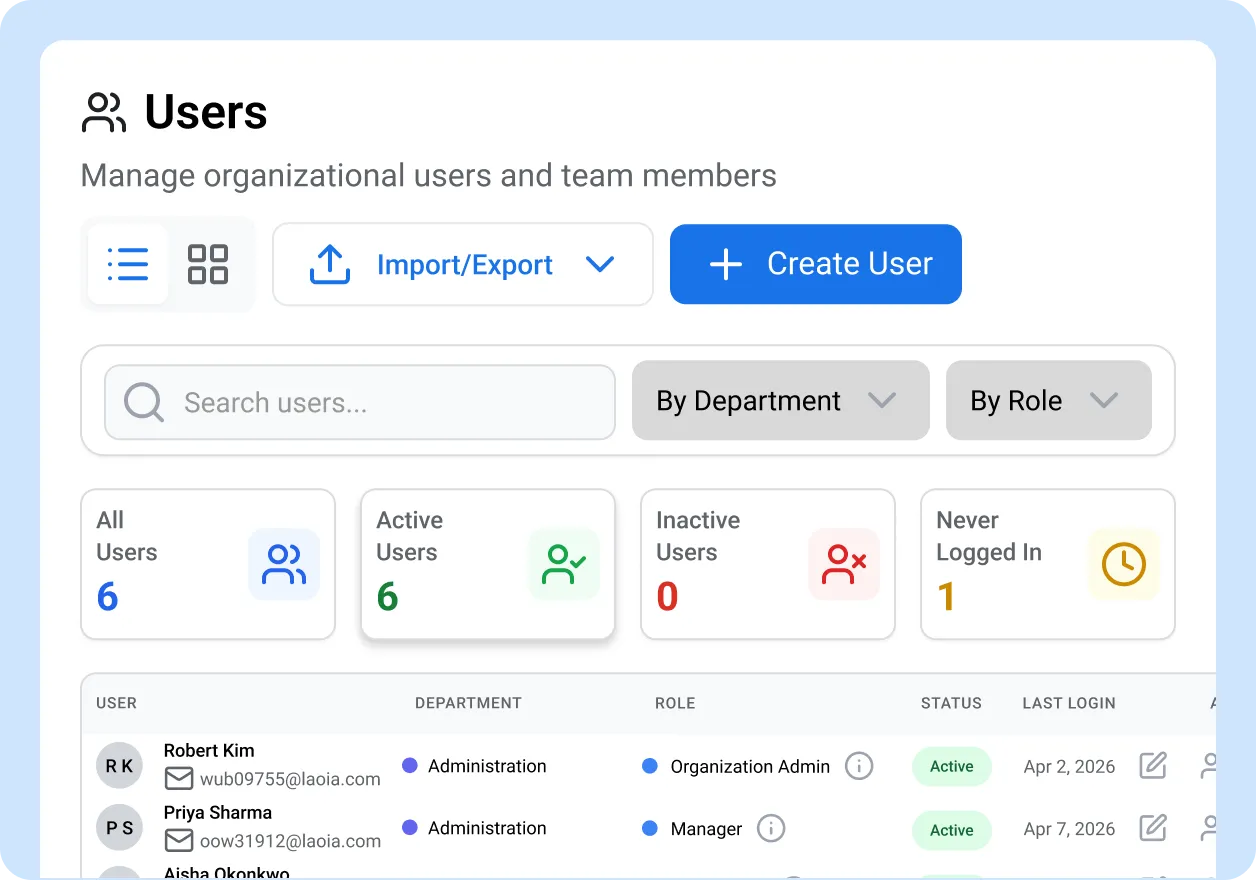
Upload a CSV with name, email, role, and department columns. ContentBridge creates accounts, assigns the correct permissions, and sends activation emails automatically. For ongoing hiring, generate self-registration invite links that new users follow to register with a pre-set role and department. Seed the five default roles with one click when setting up a new organization.
- Bulk CSV import with role and department columns
- Self-registration invite links with default role and department
- Seed default roles with one click during setup
- Account activation via email with no shared passwords
Track Every Permission Change in an Auditable Log
The activity log records every role assignment, modification, and revocation with the timestamp and the admin who made the change. Filter by user, department, date range, or action type. Export records to CSV, PDF, or Excel for compliance reviews. This audit trail supports requirements under PIPEDA, PHIPA, and ATIA. Organizations should consult legal counsel for their specific obligations.
- Every role assignment and change logged with timestamps
- Filter by user, department, date range, or action type
- Export to CSV, PDF, and Excel for compliance reviews
- Supports PIPEDA, PHIPA, and ATIA requirements
What Makes ContentBridge Role-Based Access Control Different
Every capability exists because a real organization needed to control who can create, review, and publish social media content at scale.

Five Built-In Permission Levels
Viewer, Creator, Approver, Manager, and Admin roles ship with every account. Each level has a defined set of permissions scoped to the actions that role needs. No configuration required to start using role-based access on day one.

Custom Roles With Granular Permissions
Create roles beyond the five defaults with module-level and action-level control. Decide who can view, create, edit, delete, or import within each module. Export and import role configurations via CSV for reuse across organizations.

Department-Level Access Isolation
Users see only the content, approvals, and analytics within their assigned department. A franchise in Vancouver and a franchise in Halifax work in the same system without crossing boundaries. Cross-department visibility is restricted to Managers and Admins.

Bulk User Import With Pre-Assigned Roles
Upload a CSV with name, email, role, and department columns. ContentBridge creates accounts, assigns permissions, and sends activation emails automatically. Onboard 100 users in minutes instead of spending days configuring individual accounts.

Self-Registration Invite Links
Generate invite links that new users follow to register with a pre-set role and department. Set expiry dates and maximum uses per link. Track pending registrations from the admin dashboard and approve or reject them before access is granted.

Permission Change Audit Trail
Every role assignment, modification, and revocation is logged with a timestamp and the admin who made the change. Export records to CSV, PDF, or Excel for compliance reviews under PIPEDA, PHIPA, and ATIA. Organizations should consult legal counsel for specific obligations.

“We manage 420 frontline workers across four provinces, each with different content responsibilities. Before ContentBridge, we shared one set of social media credentials across the entire organization and had no way to limit who could publish what. We now have five distinct permission levels with department isolation, and we onboarded our last 80 new hires through a CSV import that took four minutes. Our compliance officer can pull a full access audit for any user going back to day one. In 18 months, we have had zero unauthorized posts and zero credential-sharing incidents.”

Michael Torres, Director of Digital Operations
Common Questions About Role-Based Access Control
How does ContentBridge handle permissions for teams with hundreds of users?
ContentBridge assigns every user a role with module-level and action-level permissions. Five built-in levels (Viewer, Creator, Approver, Manager, Admin) cover common permission structures. Organizations on Professional and Enterprise plans can create custom roles with granular permissions scoped to specific modules and actions. Department-level isolation ensures users only see content within their assigned department.
Can we create custom roles beyond the five default permission levels?
Yes. Professional and Enterprise plans support custom roles with granular permissions. You control access at the module level (which sections a user can see) and the action level (view, create, edit, delete, import) within each module. Custom roles can be exported and imported via CSV for reuse across organizations.
Does ContentBridge log permission changes for compliance audits?
Yes. The activity log records every role assignment, modification, and revocation with the timestamp and the admin who made the change. Records are exportable to CSV, PDF, and Excel. This audit trail supports compliance requirements under PIPEDA, PHIPA, and ATIA. Organizations should consult legal counsel for their specific regulatory obligations.
Do frontline workers need social media account credentials to create posts?
No. Frontline workers log in with their own individual ContentBridge account and create content through the app. Social media accounts are connected once by an admin through OAuth. Content publishes to your official accounts only after it clears the full approval chain. Creators never see or touch your social media passwords.
How quickly can we onboard 100 new users with the correct roles and departments?
Bulk CSV import lets you upload a spreadsheet with name, email, role, and department columns. ContentBridge creates accounts, assigns permissions, and sends activation emails automatically. Self-registration invite links are also available for users to register themselves with a pre-assigned role and department. Most organizations onboard large cohorts in under 10 minutes.
Features That Work With Role-Based Access Control
Role-based permissions are one part of how ContentBridge controls who creates, reviews, and publishes content. These features work alongside it.

Approval Workflows
Posts from frontline creators flow through unlimited approval levels before publishing. Role-based permissions determine who can submit, who can review, and who gives final sign-off.

Department Management
Parent-child department trees with colour coding and org structure views. Department boundaries control which content each user can see and approve.

Compliance Audit Trail
Full chain-of-custody records for every post, from creation to publication. Exportable logs for PIPEDA, PHIPA, and ATIA compliance reviews.